
Charging a lithium battery seems simple—just plug it in, right? But if you want your battery to last long, work safely, and charge efficiently, there’s more to understand. Many people damage their lithium batteries by following old advice or using the wrong charging methods.
A little care and knowledge can help you avoid costly mistakes, whether you’re charging a phone, laptop, power tool, or an electric vehicle. Here’s a clear and practical guide to charging a lithium battery correctly, with tips that even many experienced users overlook.
What Makes Lithium Batteries Different?
Lithium batteries are everywhere today. They power our smartphones, laptops, e-bikes, and even cars. The most common types are Lithium-ion (Li-ion) and Lithium Polymer (Li-Po). These batteries offer high energy, light weight, and a long life compared to older battery types like nickel-cadmium.
One key difference: lithium batteries need precise charging. Overcharging, deep discharging, or using the wrong charger can harm them, reduce their lifespan, or even cause safety risks. This is why it’s important to know the right way to charge.
Choosing The Right Charger
Not all chargers are equal. Using the wrong charger is one of the fastest ways to ruin a lithium battery. Here’s what to look for:
- Voltage Match: The charger’s output voltage must match the battery’s rated voltage. For example, a 3.7V cell needs a charger that outputs 4.2V.
- Current Limit: Check the maximum charging current (measured in amps). Most lithium batteries prefer charging at 0.5C to 1C, where C is the battery’s capacity. For example, a 2000mAh (2Ah) battery charges safely at 1–2A.
- Charger Type: Smart chargers automatically stop charging at the right time. Avoid cheap or “universal” chargers unless they are made for lithium batteries.
If you use the wrong charger, you risk overheating, permanent damage, or even fire. Always check the user manual and battery label.
Step-by-step: How To Charge A Lithium Battery Safely
Follow these steps every time you charge a lithium battery:
- Inspect the Battery: Look for any swelling, leaks, or damage. Never charge a battery that looks abnormal.
- Connect the Charger: Use only the correct charger, with the right voltage and connector.
- Monitor Charging: Place the battery on a non-flammable surface. Avoid charging near flammable objects.
- Check Temperature: During charging, the battery should stay cool or just slightly warm. If it gets hot, unplug it immediately.
- Observe Charging Time: Most lithium batteries reach full charge in 1–3 hours. Don’t leave it charging overnight or unattended.
- End Charging at 100%: Modern chargers stop at full charge, but older or cheap ones may not. Unplug when the indicator shows full.
- Store Properly After Charging: If you’re not using the battery right away, store it at 40–60% charge, not fully charged or empty.
Understanding Charging Stages
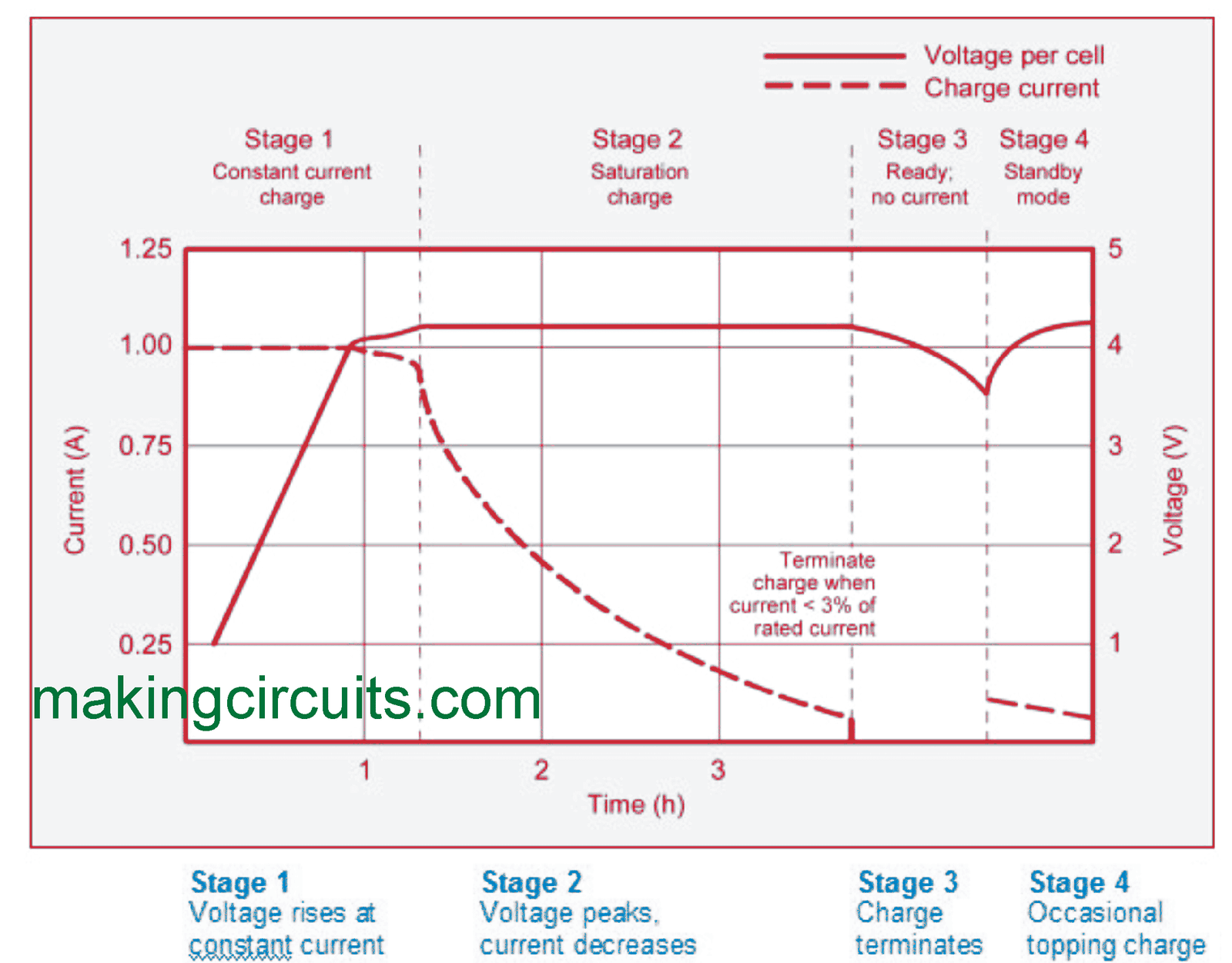
Lithium batteries charge in two main stages:
- Constant Current (CC): The charger delivers a steady current. Voltage rises slowly.
- Constant Voltage (CV): When the battery reaches its max voltage (usually 4.2V per cell), the charger holds the voltage steady. Current slowly drops to almost zero.
This CC/CV method protects the battery and fills it efficiently. Some users try “fast charging,” but this can raise heat and stress the battery unless the manufacturer approves it.
Credit: makingcircuits.com
How Charging Habits Affect Battery Life
A lithium battery’s life is measured in charge cycles—one cycle is a full charge and discharge. Most lithium-ion batteries last 300–500 cycles before losing about 20% of their original capacity. But your charging habits make a big difference.
- Partial charges are better: Charging to 80% instead of 100% can nearly double the battery’s life.
- Avoid deep discharge: Try not to let the battery fall below 20%. Deep discharge stresses lithium chemistry.
- Keep cool: Charging or using batteries in high heat ages them much faster. Room temperature is best.
Here’s a look at how charge level affects battery life:
| Charge Level (%) | Estimated Cycles | Notes |
|---|---|---|
| 100 | 300-500 | Standard full charge |
| 80 | 600-900 | Significantly extends life |
| 50 | 1500+ | Best for storage, rarely practical for daily use |
Many phone and laptop makers now offer a setting to stop charging at 80% for this reason.
Common Charging Mistakes To Avoid
Even experienced users make mistakes that shorten battery life. Here are some pitfalls to watch for:
- Using the Wrong Charger: This can overheat or undercharge the battery.
- Leaving Battery Plugged In Overnight: Can cause slight overcharge and heating, especially with cheap chargers.
- Charging in Extreme Temperatures: Charging when it’s too hot or cold harms the battery.
- Storing Fully Charged or Empty: Both can cause capacity loss. 40–60% is ideal for storage.
- Ignoring Battery Protection: Some devices bypass safety features. Always check if your device supports lithium battery protection.
An overlooked tip: if you won’t use a device for weeks, charge the battery to about 50% and turn it off. This reduces stress and slows capacity loss.

Credit: www.youtube.com
Fast Charging: Is It Safe?
Many new devices support fast charging, which fills up the battery more quickly. But is it safe for lithium batteries? The answer depends.
- Approved Devices: If your phone or laptop is designed for fast charging, it has built-in safety features. Use only the recommended charger and cable.
- Older Devices: Fast charging can overheat the battery, reduce lifespan, or cause swelling.
- Heat is the Enemy: Fast charging works by increasing current. This produces more heat, which ages the battery faster.
If you want the longest battery life, use normal charging speeds when you have time. Save fast charging for emergencies.
Charging Different Types Of Lithium Batteries
Not all lithium batteries are the same. Here’s a comparison of the most common types:
| Type | Max Voltage | Typical Use | Special Notes |
|---|---|---|---|
| Lithium-ion (Li-ion) | 4.2V/cell | Phones, laptops, power tools | Needs precise charger; sensitive to overcharge |
| Lithium Polymer (Li-Po) | 4.2V/cell | Drones, RC vehicles | Very light; can swell if overcharged |
| Lithium Iron Phosphate (LiFePO4) | 3.6V/cell | Solar, e-bikes, some EVs | More stable, longer life, different charger needed |
Always check your battery’s type and use the correct charger. Never mix chargers between different lithium chemistries.
Storing Lithium Batteries
Proper storage is just as important as proper charging. Here’s how to store lithium batteries safely:
- Charge to 40–60%: This reduces stress on the internal chemistry.
- Keep Cool and Dry: Store in a cool, dry place away from sunlight and heat.
- Avoid Metal Objects: Prevent accidental short-circuit by keeping batteries separate from keys or coins.
- Check Every Few Months: Recharge to 50% if the battery falls below 20% after long storage.
Storing at full charge or empty can both damage a lithium battery over time.
Real-world Examples
Think about your daily devices. A laptop battery kept at full charge and always plugged in may lose 20% of its capacity in just a year. But if you unplug at 80%, use it regularly, and avoid heat, it may last two years or more.
Similarly, RC hobbyists often see puffed Li-Po batteries because they overcharge or store them full.
A less obvious tip: when using a power bank or e-bike, it’s better to top up the battery before it drops below 30%. This habit reduces deep discharge cycles and keeps the battery healthier.

Credit: www.powerelectronicsnews.com
How To Tell If Your Battery Is Healthy
A healthy lithium battery charges quickly, holds a charge, and stays cool during use and charging. Signs of a battery problem include:
- Swelling or bulging
- Getting hot during charging or use
- Losing charge very quickly
- Not charging to full
If you see these signs, stop using the battery and recycle it safely.
Advanced Tips For Maximum Battery Life
If you want to get the most life from your lithium battery, try these advanced tips:
- Use a quality charger with charge cut-off and temperature monitoring.
- Balance charge: For multi-cell batteries (like e-bike or drone packs), use a charger with a balance function.
- Avoid full charge/discharge cycles: Use partial cycles when possible.
- Update device firmware: Some updates improve battery charging and management.
Understanding the battery’s data sheet or manufacturer advice can uncover hidden features like charge limits or storage modes.
Charging And Battery Safety
Lithium batteries are safe if handled correctly, but they can be dangerous if abused. Fires and explosions, while rare, usually happen because of overcharging, short circuits, or physical damage.
To stay safe:
- Never use a damaged battery
- Don’t mix old and new batteries
- Always charge in a safe place
- Dispose of old batteries properly at a recycling center
If your device gets wet, do not try to charge the battery until you’re sure it’s dry and undamaged.
Frequently Asked Questions
How Often Should I Charge My Lithium Battery?
You can charge your lithium battery whenever convenient. There’s no memory effect, so you don’t need to fully discharge it. In fact, it’s better to charge before it drops below 20%.
What Happens If I Overcharge A Lithium Battery?
Overcharging can cause swelling, overheating, and permanent damage. In rare cases, it can cause fire or explosion. Use only smart chargers that stop at full charge.
Can I Use My Device While Charging?
For most devices, it’s safe to use while charging, but heavy use may cause extra heat. Try to avoid gaming or heavy tasks while charging for the best battery health.
Is It Safe To Store Lithium Batteries Fully Charged?
No. For long-term storage, keep lithium batteries at 40–60% charge. Storing fully charged or empty can reduce lifespan.
Where Can I Learn More About Lithium Battery Safety?
Reliable information is available from battery manufacturers and industry groups. For deeper technical reading, see the Wikipedia page on Lithium-ion batteries.
Charging a lithium battery correctly is simple once you know the basics. Use the right charger, avoid heat, don’t overcharge or fully drain, and store batteries at half charge if not in use. These small habits can double your battery’s life, save money, and keep you safe.
Treat your lithium batteries well—they’ll reward you with years of reliable power.