
Testing the health of your power tool battery is more than a simple check; it can save time, money, and even your projects. Whether you use cordless drills, saws, or other battery-powered equipment, knowing the condition of your battery is key to getting the most out of your tools. Many users, especially those new to power tools, often overlook this step. However, a weak or failing battery can cause poor performance, unexpected stops, or even damage your tool. This guide will help you understand the full process of testing battery health in power tools, from basic visual checks to using advanced testers. Let’s explore each method in detail, so you can keep your tools running efficiently and safely.
Why Battery Health Matters In Power Tools
A battery’s condition directly affects your tool’s performance. A healthy battery delivers full power and lasts longer, while a weak battery can cause the tool to run slowly, stop suddenly, or even overheat. In some cases, using a faulty battery may reduce the tool’s overall lifespan. Most modern power tools use lithium-ion (Li-ion) or nickel-metal hydride (NiMH) batteries, both of which have specific care and testing needs.
Ignoring battery health can lead to:
- Reduced runtime: Shorter work sessions before recharging.
- Inconsistent power: Tools may lose power or speed during use.
- Unexpected shutdowns: Tools may stop working in the middle of a job.
- Safety risks: Damaged batteries can overheat, leak, or even catch fire.
Regular battery checks help you avoid these problems and ensure your tools always perform at their best.
Signs Your Power Tool Battery Needs Testing
Knowing when to test your battery can prevent bigger issues. Here are common signs:
- Loss of charge: The battery doesn’t last as long as before.
- Sluggish performance: Tools seem weak or slow.
- Battery won’t charge fully: Charger light doesn’t stay green or shows errors.
- Tool stops working suddenly: Even with a “charged” battery.
- Physical changes: Swelling, leaks, or corrosion on the battery.
If you notice any of these, it’s time to test the battery’s health.
Essential Tools For Battery Testing
Before you start, gather the right tools for accurate results. You don’t need to be an electrician, but having the following items will make the process smoother:
- Digital multimeter: Measures voltage and sometimes current.
- Battery analyzer/tester: Gives more detailed battery health information.
- Charger for your battery type: To ensure the battery is fully charged before testing.
- Protective gloves and glasses: Safety first, especially if your battery shows damage.
- Cleaning brush and cloth: For removing dirt or corrosion before testing.
Many beginners overlook cleaning battery terminals before testing, but dirty or corroded contacts can give false results.
How To Visually Inspect Power Tool Batteries
Before using any electronic tools, always inspect the battery. This simple step is often missed but can reveal many problems.
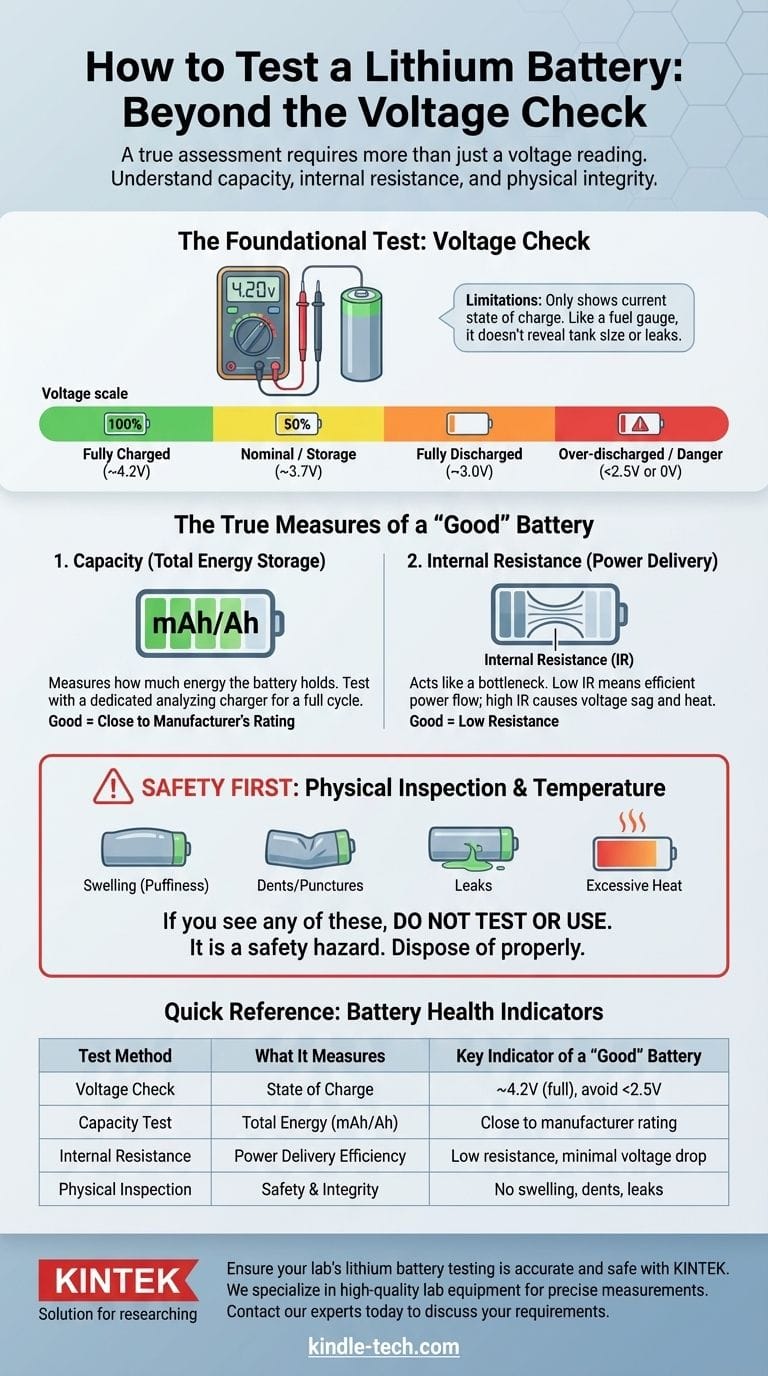
- Check for swelling: If the battery looks puffed up, it’s unsafe to use.
- Look for leaks or stains: Any liquid or white powder is a warning sign.
- Examine terminals: Rust or greenish corrosion means the contacts aren’t clean.
- Smell for odd odors: A chemical smell can signal internal damage.
- Check the casing: Cracks or dents can affect performance and safety.
If you find any of these issues, do not attempt further tests. Dispose of the battery safely according to local rules.
Charging Test: The First Step
Testing battery health should always start with a charging test. This is the simplest way to see if the battery is still functional.
- Insert the battery into the charger for its full charging cycle.
- Watch for indicator lights: Most chargers use red for charging and green for full. Some flash to indicate problems.
- Time the charging process: If a battery charges in minutes rather than hours, or never reaches “full,” it’s likely faulty.
- Check for heat: The battery should get slightly warm but not hot. Overheating means there’s a problem inside.
A battery that won’t charge or overheats should not be used.
Measuring Battery Voltage With A Multimeter
A digital multimeter is the most common tool for checking battery voltage. Here’s how to use it correctly:
- Fully charge the battery before testing.
- Set the multimeter to DC voltage. For most power tool batteries, this is 20V or higher.
- Place the red probe on the positive (+) terminal and the black probe on the negative (-) terminal.
- Read the voltage displayed.
Typical voltage ratings:
- Lithium-ion (Li-ion): 18V battery should show 18–20V when fully charged.
- NiMH/NiCd: 12V battery should show 12–13V.
If the voltage is much lower than the rating, the battery is weak or damaged.
Understanding Voltage Drop
Some batteries show full voltage at rest but drop quickly under load. This “voltage drop” means the battery can’t hold power when used.
Tip: Measure voltage, then use the tool for a few minutes and test again. If the voltage drops sharply, the battery is failing.
Credit: www.dell.com
Load Testing: Simulating Real Use
Load testing checks how the battery performs under real conditions. It’s more accurate than just testing voltage.
- Attach the battery to the tool.
- Use the tool for 2-3 minutes of continuous operation.
- Quickly remove the battery and measure the voltage with your multimeter.
Compare “before” and “after” voltages. A healthy battery will only drop slightly (less than 1V). A big drop means the battery can’t keep up with the tool’s power needs.
Here’s a comparison of typical voltage drops:
| Battery Type | Before Load (V) | After Load (V) | Voltage Drop (V) |
|---|---|---|---|
| Healthy Li-ion (18V) | 19.5 | 18.8 | 0.7 |
| Weak Li-ion (18V) | 18.9 | 16.2 | 2.7 |
| Healthy NiMH (12V) | 13.2 | 12.5 | 0.7 |
| Weak NiMH (12V) | 12.8 | 10.2 | 2.6 |
A drop greater than 2V usually means the battery is close to the end of its life.
Using A Battery Analyzer For Detailed Results
A battery analyzer gives more information than a multimeter. It can measure:
- Capacity (mAh or Ah)
- Internal resistance
- Charge and discharge cycles
Most analyzers require you to connect the battery directly. They charge and discharge the battery, then display results like actual capacity (how much energy the battery holds) and internal resistance (how hard it is for electricity to flow).
High internal resistance means the battery is wearing out, even if voltage looks fine. New batteries have low resistance; old ones have high resistance.
Here’s a typical result comparison:
| Battery Age | Rated Capacity (Ah) | Measured Capacity (Ah) | Internal Resistance (mΩ) |
|---|---|---|---|
| New | 2.0 | 1.95 | 45 |
| Used (2 years) | 2.0 | 1.45 | 110 |
| Failing | 2.0 | 0.6 | 280 |
Look for a capacity under 60% of the rated value or resistance over 200mΩ—these batteries should be replaced.
Credit: www.dell.com
Common Mistakes When Testing Power Tool Batteries
Many users—especially beginners—make mistakes that lead to wrong conclusions:
- Testing before charging: Always fully charge before any test.
- Ignoring terminal cleanliness: Corroded contacts give false low readings.
- Relying only on “tool feels weak”: Always use measuring tools for accurate results.
- Testing hot batteries: Batteries should be cool for reliable tests.
- Skipping load tests: Resting voltage doesn’t tell the full story.
Avoid these mistakes for accurate battery health checks.
When To Replace Your Power Tool Battery
Replace your battery if you see:
- Physical damage: Swelling, cracks, leaks.
- Capacity below 60% of rated value.
- Can’t hold charge: Loses power within minutes.
- Overheats regularly: Even when not used hard.
Old batteries can sometimes be “revived” by deep cycling (discharging and fully recharging several times), but this is only a short-term fix. For safety and reliable performance, new batteries are best.
How To Extend Power Tool Battery Life
Testing is important, but so is prevention. Here are proven ways to make batteries last longer:
- Store batteries at moderate temperatures: Avoid extreme heat or cold.
- Don’t leave on the charger: Remove once fully charged.
- Charge before full discharge: Li-ion batteries prefer being topped up.
- Clean contacts regularly: Dirt and corrosion shorten battery life.
- Use the right charger: Using another brand/model can damage cells.
- Rotate batteries: If you have more than one, use them evenly.
Many people miss the importance of storage temperature—leaving batteries in a hot car or a freezing garage can shorten their life by up to 50%.
Battery Testing: Diy Or Professional Help?
Most battery health checks can be done at home with simple tools. However, if you notice:
- Severe swelling or leaks
- Strange noises
- Burning smell
Stop testing immediately. Take the battery to a professional or recycling center. Never try to open or repair batteries yourself; it’s dangerous and rarely worth the risk.
For more on battery technology and care, Wikipedia’s battery page offers detailed insights.
Credit: kindle-tech.com
Frequently Asked Questions
How Often Should I Test My Power Tool Batteries?
Test your batteries every 3–6 months if you use your tools often. For rarely used tools, check before any big project.
Can I Use A Car Battery Tester On Power Tool Batteries?
No, car battery testers are designed for larger, lead-acid batteries and may damage power tool batteries or give wrong results.
What Does It Mean If My Battery Charges Too Quickly?
A battery that charges unusually fast usually means it has lost capacity and can no longer hold a full charge. It’s a sign the battery is wearing out.
Is It Safe To Open A Power Tool Battery For Repair?
Opening batteries is not recommended. It can be dangerous and may void any warranty. Most users should replace instead of repair.
How Do I Dispose Of Dead Power Tool Batteries?
Take old batteries to a proper recycling center. Do not throw them in regular trash, as they contain chemicals that can harm the environment.
Testing your power tool battery’s health is not hard, but it does require attention to detail and the right tools. By following these steps, you can make smarter choices about replacing or maintaining your batteries, save money, and keep your power tools working like new for years to come.