
Many people who enjoy woodworking or home improvement find themselves choosing between a router and a jigsaw. These two tools look quite different and have their own unique uses, but sometimes their abilities overlap. Choosing the right tool can help you finish your project faster, make cleaner cuts, and avoid frustration. If you are new to woodworking, understanding the differences between a router and a jigsaw is a smart place to begin.
Both tools are common in workshops. However, picking the wrong one can lead to damaged materials or wasted time. In this article, you’ll discover what makes each tool unique, their strengths and weaknesses, and how to decide which one you really need.
By the end, you’ll have a clear understanding of when to reach for a router or a jigsaw—and maybe both.
What Is A Router?
A router is a power tool used to hollow out or shape areas of wood, plastic, or even some metals. The main part is a fast-spinning bit, which cuts away material as you guide it along the surface or edge. Routers come in two main types: fixed-base and plunge. The fixed-base router stays at one depth, while the plunge router lets you push the bit down into the material.
Routers are known for making decorative edges, smooth grooves, and perfect slots for joints. They are also essential for making signs, cabinet doors, and inlay work. Many routers have adjustable speed and depth settings, letting you control the cut very precisely.
Typical Router Uses
- Cutting decorative edges on tables, shelves, or frames
- Making grooves, slots, or dados for joints
- Hollowing out material for inlays or hardware
- Trimming laminate or veneer
- Lettering and sign-making
A router is often used with a guide or fence to keep the cut straight and even. Some more advanced projects use router tables, where the tool is mounted upside-down for extra stability.
Key Features Of Routers
- High-Speed Spinning Bit: Most routers spin at 8,000–30,000 RPM.
- Interchangeable Bits: There are dozens of bit shapes for different profiles and cuts.
- Depth Adjustment: Lets you control how deep the cut is.
- Precision: Great for small, detailed work.
- Dust Collection: Many routers can connect to a vacuum for cleaner work.
Routers are best for shaping and finishing, not for cutting out general shapes or curves.
What Is A Jigsaw?
A jigsaw is a handheld power saw with a thin, straight blade that moves up and down rapidly. Jigsaws are famous for their ability to make curved, irregular, and straight cuts in many materials, including wood, plastic, metal, and even ceramic tiles (with the right blade).
You guide the jigsaw along the line you want to cut. The thin blade can turn easily, so you can cut wavy shapes, circles, or custom patterns. Jigsaws are especially useful when you need to start a cut in the middle of a board—just drill a hole, insert the blade, and you can start cutting from inside the shape.
Typical Jigsaw Uses
- Cutting curves or circles in wood or plastic
- Making straight or angled cuts in boards or panels
- Cutting out sink holes in countertops
- Trimming flooring around obstacles
- Cutting metal with a special blade
Jigsaws are simple to use and safer than circular saws. They are not as precise as routers but are much more flexible for freehand shapes.
Key Features Of Jigsaws
- Reciprocating Blade: The blade moves up and down, usually 500–3,000 strokes per minute.
- Variable Speed: Lets you match the speed to the material.
- Orbital Action: Some jigsaws move the blade in a small oval, cutting faster in thick wood.
- Bevel Cutting: Many jigsaws can tilt to cut angles up to 45 degrees.
- Tool-Free Blade Change: Swapping blades is quick and easy.
Jigsaws are best for cutting shapes, not for creating detailed edges or grooves.
Router Vs Jigsaw: Main Differences
It’s easy to see these are both power tools, but their designs, uses, and strengths are quite different. Here’s a side-by-side look at some important factors:
| Feature | Router | Jigsaw |
|---|---|---|
| Cutting Action | Spinning bit | Up-and-down blade |
| Main Use | Shaping edges, grooves, joints | Cutting curves, shapes, openings |
| Precision | Very high | Moderate |
| Best For | Decorative work, joinery | Rough cutting, patterns |
| Material Thickness | Limited by bit length | Can cut thick materials |
| Safety | Requires both hands, eye protection | Generally safer, but blade can break |
What Projects Suit Each Tool?
Knowing what you want to build is the best way to choose between a router and a jigsaw. Here are examples to guide you:
When To Use A Router
- You want smooth, decorative edges on a tabletop or shelf.
- You need to make precise slots for joining two boards together.
- You are creating raised panel cabinet doors.
- You want to add letters or patterns to a sign.
- You need to trim laminate or veneer flush to the edge.
When To Use A Jigsaw
- You need to cut a circle or other curved shape in plywood.
- You are cutting out a sink opening in a countertop.
- You want to make quick, rough cuts to get a piece to size.
- You need to cut around pipes or odd shapes in flooring.
- You want to start a cut from inside a panel.
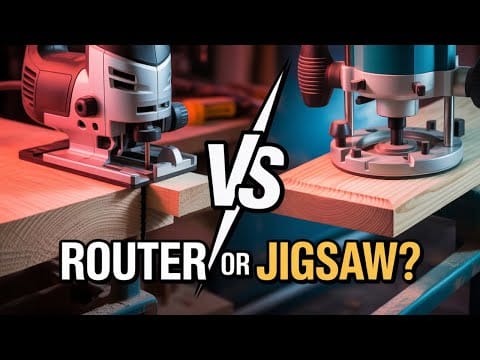
The jigsaw is your “go anywhere, cut anything” tool, while the router is the master of details and finishing.
Credit: www.youtube.com
Strengths And Weaknesses
Every tool has its pros and cons. Understanding these will help you pick the right one for your job and avoid common mistakes.
Router Strengths
- Precision: Routers create clean, repeatable cuts.
- Versatility: With different bits, you can make hundreds of profiles and joints.
- Finishing Power: Nothing beats a router for polished edges and grooves.
- Customization: Perfect for custom signs and patterns.
Router Weaknesses
- Not designed for cutting out rough shapes or curves.
- Can burn wood if moved too slowly or used with dull bits.
- More expensive than jigsaws, especially with many bits.
- Louder and makes more dust.
Jigsaw Strengths
- Flexibility: Cuts almost any shape you can draw.
- Easy to Start: Great for beginners or simple projects.
- Portable: Lightweight and works anywhere.
- Affordable: Blades are cheap and easy to replace.
Jigsaw Weaknesses
- Struggles with perfectly straight lines (unless using a guide).
- Not for decorative edge work or joinery.
- Blades can bend, leading to uneven cuts in thick material.
- Cuts are rougher and need sanding to finish.
Which Tool Is Easier For Beginners?
For most people, the jigsaw is easier to pick up and use safely. Its blade is visible, it’s lighter, and mistakes are usually less serious. Jigsaws are forgiving—you can practice on scrap wood and improve quickly.
Routers require more setup, careful handling, and an understanding of feed direction. Using the wrong bit or feeding too fast can damage your workpiece or the bit. Routers are not dangerous with the right technique, but they do need more respect and learning.
A common beginner mistake is trying to use a jigsaw for detailed edge work or a router for rough curves. Each tool has its zone where it shines.
Cost And Maintenance
Money is always a factor. Here’s a closer look at what you can expect with each tool:
| Tool | Average Cost | Maintenance Needs | Accessory Cost |
|---|---|---|---|
| Router | $80–$300+ | Clean bits, check brushes, lubricate base | Bits: $10–$40 each |
| Jigsaw | $40–$150 | Keep blade clamp clean, oil moving parts | Blades: $2–$10 each |
Routers cost more up front, and bits are more expensive than jigsaw blades. However, a router bit lasts a long time if treated well. Jigsaw blades wear out faster, especially on hard materials.
Safety Tips For Both Tools
No matter which tool you choose, safety comes first. Here are some essential tips:
- Wear safety glasses and hearing protection.
- Keep hands away from the cutting area. For routers, always keep both hands on the tool.
- Clamp your workpiece firmly. Moving wood is dangerous.
- Check the blade or bit before starting. Dull or damaged tools are unsafe.
- Unplug when changing blades or bits.
- Go slow with thick or hard materials. Forcing the tool can cause accidents.
- Let the blade or bit come to a full stop before setting the tool down.
An often-overlooked tip: keep your workspace clean. Sawdust and scrap wood can cause slips or make it hard to see your work.
Credit: diy.stackexchange.com
Real-world Examples
Let’s look at two practical project examples to show the difference:
Building A Bookshelf
- Jigsaw: Used to cut the side panels to shape, especially if you want a curved top.
- Router: Used to add a decorative edge to the shelves and cut perfect dadoes for strong joints.
Installing A Kitchen Sink
- Jigsaw: Used to cut the hole in the countertop. Drill a starter hole, insert the blade, and follow the line.
- Router: Not usually used, unless you want a smooth, rounded edge around the opening after the jigsaw cut.
These examples show that both tools are often used together for best results. The jigsaw does the rough work; the router makes it look professional.
Common Mistakes To Avoid
- Using the wrong tool for the job: Don’t try to cut a complex shape with a router or a perfect groove with a jigsaw.
- Ignoring feed direction with routers: Always move the router against the bit’s rotation for a clean cut.
- Skipping blade or bit changes: Dull tools are dangerous and damage your project.
- Not clamping workpieces: Both tools can grab and move loose boards, causing mistakes or injury.
- Rushing the cut: Take your time, especially with a router. Fast feeds can chip wood or break bits.
A non-obvious insight: For perfect circles, use a router with a circle-cutting jig for a flawless edge, but use a jigsaw if you only need a rough shape or plan to sand the edge later.
Which One Should You Buy First?
If you’re just starting and must choose one, think about your projects:
- For furniture, cabinets, or decorative work: Get a router first.
- For general DIY, crafts, or home repair: Get a jigsaw first.
Many serious woodworkers eventually own both. The router and jigsaw do different jobs, and having both makes your workshop much more capable.
Expert Tips For Better Results
- When using a jigsaw, use the right blade for the material. Fine-tooth blades are best for plywood, while coarse ones cut faster in thick lumber.
- For routers, choose a sharp carbide-tipped bit for long life and smoother cuts. Cheap bits burn out fast.
- Make test cuts on scrap wood before your real piece. This helps you check depth, speed, and finish.
- Use a guide or fence for straight router grooves or jigsaw cuts.
- Clean your tools after every project. Sawdust buildup can make both tools less accurate and safe.
If you want to see more about woodworking tools, you can check this comprehensive guide from Wikipedia.
Credit: www.reddit.com
Frequently Asked Questions
What Is The Main Difference Between A Router And A Jigsaw?
The router is used for shaping, edging, and making grooves, while the jigsaw is made for cutting curves, shapes, and openings in various materials.
Can You Use A Router Instead Of A Jigsaw?
No, a router cannot replace a jigsaw. Routers are not designed for cutting out shapes or curves. Use a jigsaw for these tasks.
What Materials Can Routers And Jigsaws Cut?
Both can cut wood, plastic, and some metals. However, routers need special bits for harder materials, and jigsaws need the right blade.
Which Tool Is Safer For Beginners?
The jigsaw is generally safer and easier to control for beginners. Routers require more skill and attention to detail.
Do I Need Both A Router And A Jigsaw For Woodworking?
If you want to do a wide range of projects, having both tools is best. They complement each other, each doing jobs the other cannot.
Choosing between a router and a jigsaw is not always simple, but with the right information, you can make a confident decision. Think about what you want to build, your skill level, and your budget. Soon, you’ll find your favorite tool—and make your projects look better than ever.