
Affiliate Disclosure: As an Amazon Associate I earn from qualifying purchases.
To test a capacitor with a multimeter, disconnect power, verify zero voltage, discharge the capacitor safely, isolate it from the circuit when practical, select capacitance mode, and measure across its terminals. Compare the reading with the capacitance and tolerance printed on the capacitor. A reading far outside that tolerance, a short, or an open condition can indicate failure.
Whether you’re fixing appliances, electronics, or low-voltage gear, knowing how to check a capacitor’s health is a useful skill. In this guide, you’ll learn simple step-by-step methods to test your capacitor quickly and safely using a multimeter. For HVAC, appliance, motor-start, microwave, or other high-voltage capacitors, let a qualified technician handle removal and discharge.
Keep reading, and you’ll gain the confidence to diagnose capacitor issues like a pro.
Types Of Capacitors
Capacitors come in different types. Each type has unique features and uses. Knowing these helps test them correctly with a multimeter. Some capacitors store more charge, while others work better at high frequencies. The size, shape, and material also vary. Below are the common types of capacitors you may find.
Electrolytic Capacitors
Electrolytic capacitors store large amounts of charge. They are often used in power supplies and audio equipment. These capacitors are polarized, meaning they have a positive and negative side. Testing requires attention to this polarity to avoid damage. They look like small cans with two leads.
Ceramic Capacitors
Ceramic capacitors are small and non-polarized. They work well in high-frequency circuits. These capacitors have a ceramic material as the dielectric. They are common in radios, computers, and other electronics. Testing them is simpler because polarity does not matter.
Tantalum Capacitors
Tantalum capacitors are similar to electrolytic but smaller and more stable. They also have polarity, so testing must respect this. These capacitors provide steady capacitance in small packages. They are often found in mobile devices and medical equipment.
Film Capacitors
Film capacitors use a plastic film as the dielectric. They offer good stability and low loss. These capacitors are usually larger and non-polarized. They are common in audio and power electronics. Testing film capacitors is straightforward due to their stable nature.
Supercapacitors
Supercapacitors store very high charge for short periods. They are used for backup power and energy storage. These capacitors have a larger physical size. Testing supercapacitors often requires special settings on a multimeter. They are different from regular capacitors in capacity and use.
Safety Precautions
Testing a capacitor with a multimeter involves handling electrical components that can store energy. Taking safety precautions is important to avoid shocks and damage to the device or yourself. Understanding and applying these safety steps will help keep you safe during testing.
Discharge The Capacitor Before Testing
Capacitors can hold a charge even after power is off. Disconnect power, verify the circuit is de-energized, and discharge the capacitor with the manufacturer-recommended discharge tool or a properly rated resistor. Do not bridge the terminals with a direct metal short; sudden current can create a spark, damage the part, or injure you. Never touch the terminals directly before verifying zero voltage.
Wear Protective Gear
Use safety glasses to protect your eyes from sparks or debris. Wear insulated gloves to reduce the risk of electric shock. Avoid loose clothing that can catch on components.
Use A Multimeter With Proper Ratings
Choose a multimeter rated for the voltage and capacitance you will test. Using the wrong tool can cause inaccurate readings or damage. Check your multimeter’s manual before starting.
Work In A Dry, Well-lit Area
Keep your workspace dry to prevent electrical hazards. Good lighting helps you see connections clearly and avoid mistakes. Clear the area of clutter to focus on the task.
Disconnect Power Sources
Always turn off and unplug the circuit or device before testing. This reduces the risk of electric shock and protects your multimeter. Confirm no power flows with your meter before proceeding.
Tools Needed
Testing a capacitor requires specific tools to ensure accurate results. Having the right equipment makes the process simple and safe. This section covers the essential tools needed to test a capacitor with a multimeter.
Digital Multimeter
A digital multimeter is the main tool for testing capacitors. It measures voltage, resistance, and capacitance. Choose a multimeter with a capacitance testing feature for best results. This tool provides clear readings on a digital display.
Insulated Test Leads
Insulated test leads connect the multimeter to the capacitor. They protect you from electric shock. Use leads that fit securely into the multimeter and make good contact with the capacitor terminals.
Capacitor Discharge Tool Or Rated Resistor
Use the discharge method specified by the equipment or capacitor manufacturer. For small low-voltage capacitors, a properly rated resistor or purpose-built discharge tool releases stored energy in a controlled way. Avoid direct terminal shorting because the sudden current can arc, pit terminals, or damage nearby parts.
Protective Gloves
Wear insulated gloves to protect your hands. Capacitors can hold dangerous voltage. Gloves add an extra layer of safety while handling electrical components.
Safety Glasses
Safety glasses protect your eyes from sparks or debris. They are important when working with electrical parts. Always wear them during testing to avoid injury.
Credit: www.electricaltechnology.org
Preparing The Capacitor
Preparing the capacitor is the first step before testing it with a multimeter. This step ensures safety and accurate readings.
Capacitors can hold an electric charge even after power is off. Discharging the capacitor is essential to avoid shocks and damage to the multimeter.
Discharging The Capacitor
After disconnecting power, verify there is no live voltage with the meter. Then discharge the capacitor using the manufacturer-recommended method, a purpose-built discharge tool, or a resistor rated for the capacitor voltage and stored energy. Keep your hands away from bare metal, wait for the discharge period specified by the equipment, and confirm the terminal voltage is near zero before testing.
Do not use a direct metal short across the terminals. High-voltage or high-energy capacitors can arc, heat, or fail violently, so HVAC, appliance, motor-start, microwave, and unknown capacitors should be handled by a qualified technician.
Inspecting The Capacitor
Check the capacitor’s body for any visible damage. Look for bulges, cracks, or leaks. Damaged capacitors should be replaced instead of tested.
Clean the capacitor terminals if they look dirty or corroded. Use a small brush or cloth to remove any dirt or rust.
Setting Up Your Work Area
Work in a dry, well-lit area. Keep the capacitor on a non-conductive surface like wood or plastic. This avoids accidental shorts during testing.
Gather your multimeter and necessary tools nearby. Having everything ready will speed up the testing process.
Setting The Multimeter
Setting the multimeter correctly is the first step to test a capacitor. A proper setup ensures accurate and safe measurements. Follow these simple steps to prepare your multimeter.
Choosing The Right Multimeter Mode
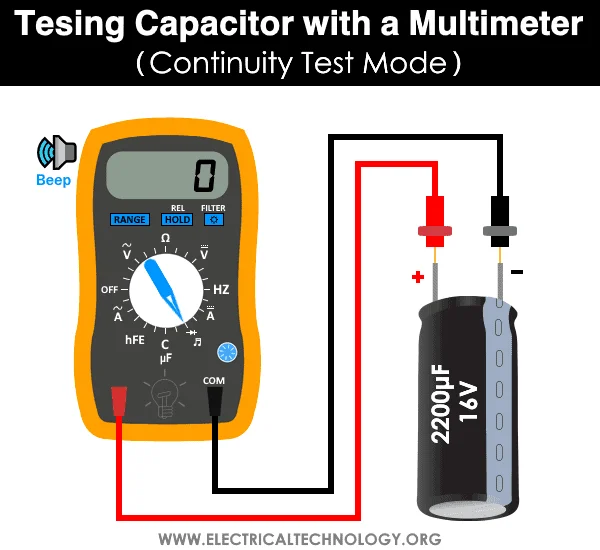
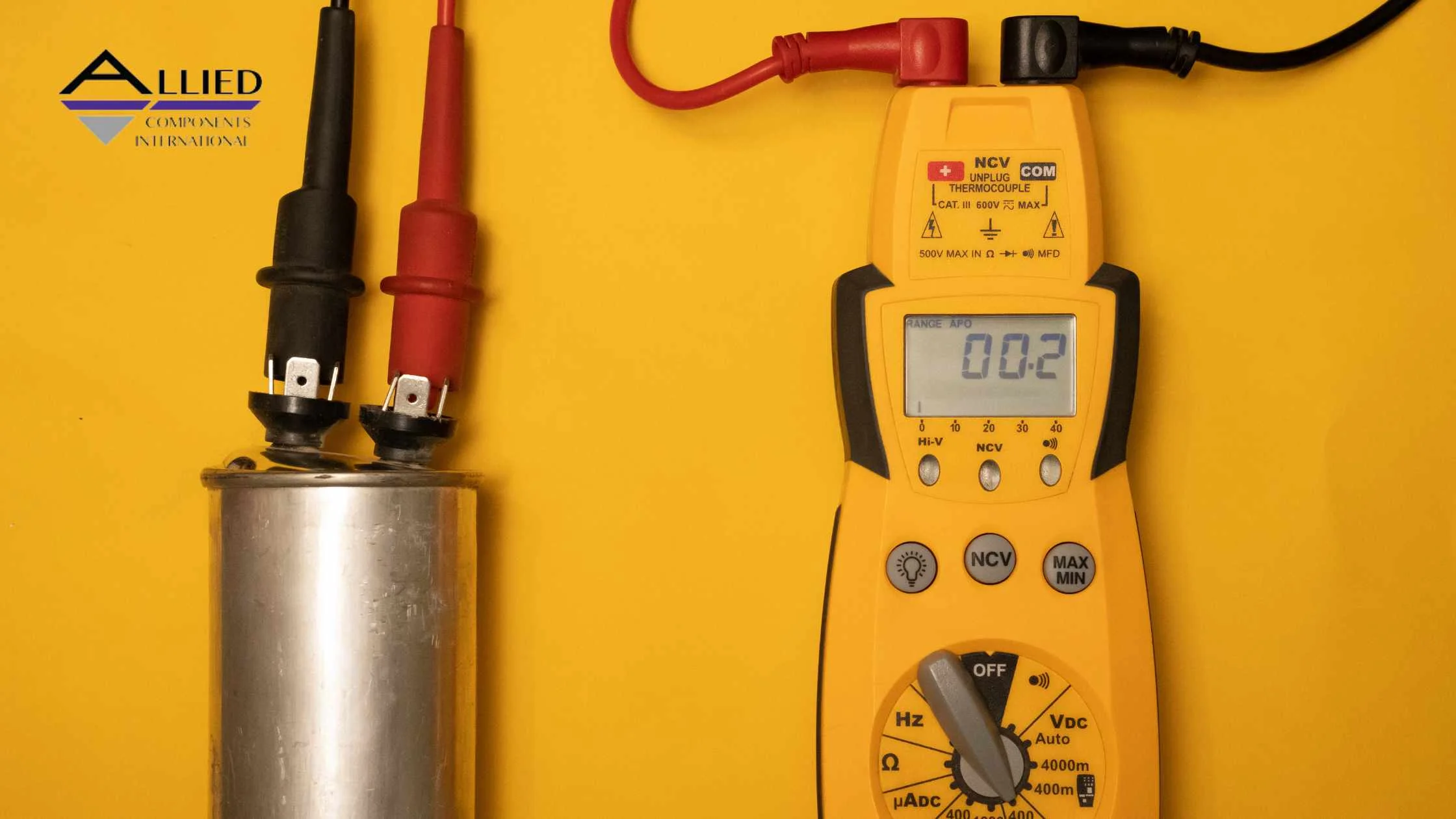
Select the capacitance mode (often marked with a capacitor symbol or F/µF) according to the meter’s manual. If the multimeter lacks capacitance mode, resistance (ohms) mode may provide only a rough screen for a short or charging response; it cannot measure capacitance or prove the capacitor is good.
Adjusting The Range Setting
Set the range to match the capacitor’s expected value. For example, if the capacitor rating is in microfarads (µF), choose a range that includes this value. Auto-ranging multimeters adjust this automatically.
Preparing The Probes
Connect the black probe to the common (COM) port. Insert the red probe into the port labeled for capacitance or voltage. Ensure the probes are clean and undamaged for a reliable reading.
Safety Precautions Before Testing
Discharge the capacitor fully before testing, then verify the remaining voltage with the multimeter. Use a rated resistor or purpose-built discharge tool, following the equipment instructions. If the capacitor is high-voltage, high-energy, inside an appliance/HVAC unit, or you are unsure of the rating, stop and call a qualified technician.
Credit: www.alliedcomponents.com
Testing Capacitance
Testing a capacitor with a multimeter involves measuring its capacitance or resistance. Begin by discharging the capacitor, then connect the meter leads to its terminals. Watch the reading to see if it matches the capacitor’s rated value for a proper test.
Understanding Capacitance Testing
Testing capacitance shows how much charge a capacitor can hold. It helps find out if the capacitor works well or not. A multimeter with a capacitance setting measures this value. This test is simple and fast.
Before testing, disconnect power, verify zero or near-zero voltage, safely discharge the capacitor, and isolate at least one lead from the circuit when practical so surrounding components do not distort the capacitance reading. Use a properly rated resistor or discharge tool instead of direct terminal shorting.
Setting Up The Multimeter
Turn on your multimeter and select the capacitance mode. This mode often has a symbol like “—|(|—”. If your multimeter lacks this mode, you cannot measure capacitance directly.
Next, connect the multimeter probes to the capacitor terminals. Polarity matters for polarized capacitors. Red probe goes to positive, black to negative.
Reading The Capacitance Value
Watch the multimeter display after connecting probes. It shows the capacitance in microfarads (µF) or nanofarads (nF). Compare this reading to the capacitor’s labeled value.
Compare the isolated capacitor’s measured capacitance with its rated value and stated tolerance, allowing for meter accuracy and lead capacitance. A substantially out-of-tolerance result may indicate a fault. On capacitance mode, an OL/over-range indication can also mean the part exceeds the meter’s selected range, so check the meter range and manual before concluding the capacitor is open or damaged. A capacitance reading within tolerance does not rule out excessive leakage or ESR.
Using Ohms Mode For Testing
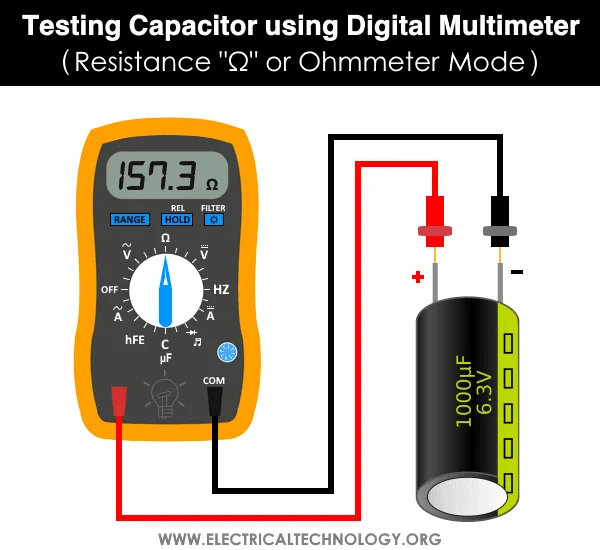
Ohms mode can sometimes reveal a persistent short or a charging-related change on an isolated, fully discharged capacitor, but results depend on capacitance, meter test current and range. It cannot reliably identify every open or degraded capacitor and does not measure its capacitance in farads.
This test is useful for quick screening, but it is not an exact capacitance measurement. Ohms mode can suggest a shorted, open, or badly leaking capacitor; use capacitance mode or a dedicated capacitance/ESR tester when the actual microfarad value matters.
Preparing The Capacitor And Multimeter
First, ensure the capacitor is fully discharged and verify the terminal voltage. Use a properly rated resistor or discharge tool, not a direct metal short. This step helps prevent damage to the multimeter and reduces shock or arc risk.
Set the meter to resistance mode and follow the manufacturer’s range instructions; an auto-ranging meter may change ranges on its own. A visible charging response is not guaranteed, especially for very small capacitances or certain meter designs.
Connecting The Multimeter Leads
With power removed and the capacitor fully discharged and isolated, connect the probes according to the meter manual. Observe polarity markings on electrolytic or tantalum capacitors and avoid applying reverse polarity. Watch the display, but do not assume that a particular resistance trend is a pass/fail test.
Interpreting The Resistance Readings
Some capacitors may show an initially lower resistance that rises as the meter charges them. Other healthy capacitors may show OL immediately or no visible change because the capacitor is small or the meter responds differently. A rising resistance is not proof of acceptable capacitance or ESR.
A persistent near-zero resistance on an isolated, fully discharged capacitor can suggest a short, though test-lead or measurement errors should be excluded. A consistently high/OL resistance alone does not prove an open capacitor; confirm using capacitance mode and the component’s specifications.
Understanding Limitations Of Ohms Mode Testing
This method cannot measure the exact capacitance value. It only detects major faults like shorts or opens. For precise measurements, a capacitance meter is needed.
Still, ohms mode testing is a quick and easy way to assess basic capacitor health before deeper testing.
Credit: www.electricaltechnology.org
Interpreting Results
Interpreting the results after testing a capacitor with a multimeter is crucial. It tells you if the capacitor works or needs replacement. Understanding these readings saves time and prevents device damage.
Each type of reading reveals a different aspect of the capacitor’s health. Correct interpretation helps in making the right repair decisions. Below are key points to understand your multimeter results clearly.
Reading The Resistance Value
If you use resistance mode for a preliminary screen, a transient change may reflect the meter charging the capacitor, while persistent very low resistance may indicate a short. This response varies with the component and meter: an immediate OL reading does not prove an open circuit or that the capacitor is healthy. Use capacitance mode for the actual rated-value comparison.
Checking The Capacitance Measurement
Use capacitance mode on a safely discharged, isolated component and compare the result with its labeled capacitance and tolerance. An unexpectedly low or high value may indicate damage or a range/connection error; an OL reading may simply mean the value is outside the meter’s measurement range. If results are uncertain, consult the meter manual and test again before deciding the capacitor has failed.
Observing The Voltage Behavior
Use voltage mode to verify that the disconnected capacitor is safely discharged before touching or measuring it. Watching voltage in this mode, without a specified external test circuit and procedure, is not a reliable capacitor health test. Capacitance mode measures the value using the meter’s own charging method; leakage and ESR require appropriate additional tests.
Related testing guides: A weak capacitor can affect motors and other electrical parts. If you are troubleshooting a larger circuit, also check our guides on testing a fuse with a multimeter and using a voltage tester.
Frequently Asked Questions
How Do You Tell If A Capacitor Is Bad With A Multimeter?
Set the multimeter to resistance mode and connect leads to capacitor terminals. Some capacitors show a brief resistance change as the meter charges them, but others show no visible change even when serviceable. A sustained near-zero reading may suggest a short after excluding circuit and lead effects; confirm with capacitance mode. Always discharge the capacitor before testing to avoid damage.
What Is The Symbol For Capacitor Testing On A Multimeter?
The symbol for capacitor testing on a multimeter is often “—|(—” or a small parallel line icon. It represents capacitance measurement mode.
How To Test A Capacitor With An Ohmmeter?
After isolating and safely discharging the capacitor, use ohms mode only as a preliminary check and follow your meter’s range instructions. A changing resistance may reflect charging; an immediate OL reading is not automatically a fault. Persistent very low resistance may indicate a short, but confirm the diagnosis with an actual capacitance measurement.
What Is The Symbol For Microfarad On A Multimeter?
The symbol for microfarad on a multimeter is “µF. ” It represents capacitance measurement units.
How Do I Test A Capacitor With A Digital Multimeter?
Set your multimeter to capacitance mode, connect the leads to capacitor terminals, and read the value displayed.
What Does A Bad Capacitor Reading Look Like?
A capacitor may be faulty if its isolated capacitance is outside the manufacturer’s stated tolerance or it fails appropriate leakage/ESR tests. Zero, OL or unstable readings can also reflect meter range, test leads, residual charge, or measurement setup; check these before replacing the part.
Conclusion
For low-voltage, low-energy parts, first disconnect the circuit, verify it is de-energized, safely discharge the capacitor, then use the meter’s capacitance mode to compare the isolated component with its rated value and tolerance. Resistance mode is only a limited screening tool. For high-energy, HVAC, appliance, motor-start or unfamiliar capacitors, seek a qualified technician rather than attempting discharge or removal yourself.
For related meter skills, see how to measure resistance with a multimeter and our multimeter basics guide. These are useful when your meter lacks a dedicated capacitance range or when you need to verify the meter setup before troubleshooting.
Read also: How to Test a Motor With a Multimeter
Read also: How to Test a Battery With a Multimeter
Sources Checked
- Virginia Tech Environmental Health & Safety: capacitor stored-energy hazards and discharge controls
- OSHA 1926.967: capacitor work, de-energizing, and short-circuiting requirements for qualified work settings
- Fluke: How to Measure Capacitance with a Digital Multimeter (measurement ranges, discharge and OL readings)
- Keysight: Capacitor testing, in-circuit limitations and ESR
- OSHA personal protective equipment overview
